
When your laptop starts acting up, knowing HP Laptop Repair in Kansas City, MO timelines can save you a lot of stress. Whether it’s for work, school, or personal projects, planning around repair time helps you avoid unexpected downtime and stay on top of your tasks.
By understanding what affects repair duration, you’ll know how long to expect your laptop to be out of action and how to plan your day-to-day work. This knowledge also helps you make smarter choices—like whether to opt for express service or prepare backup solutions—so you can get back to using your HP laptop smoothly without unnecessary delays.
Several factors can affect how quickly your HP laptop gets fixed. The type of issue—whether it’s a hardware problem like a failing battery or screen, or a software glitch such as operating system errors—plays a big role. Parts availability, diagnostic complexity, and the technician’s workflow in Kansas City, MO also influence repair duration. Understanding these elements gives you realistic expectations and peace of mind while your device is in the shop.
Common Issues with HP Laptops
If you’re looking into HP Laptop Repair in Kansas City, MO, it helps to know what problems most laptops face. Understanding the common issues gives you a sense of how long repairs might take and what to expect from the process.
Hardware Problems
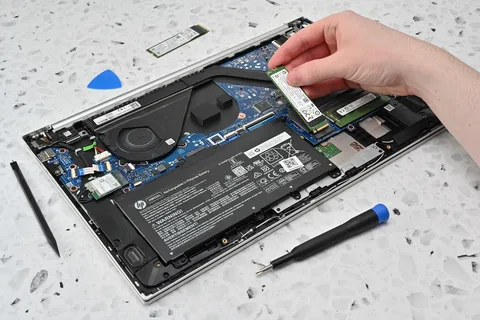
Many HP laptops experience hardware issues over time. This can include a failing battery, a cracked or flickering screen, unresponsive keyboards, or motherboard failures. Hardware problems often require parts replacement or intricate technical work, which can extend the repair timeline.
Software Issues
Software glitches are also frequent. These include operating system errors, malware or virus infections, driver conflicts, and corrupted software files. While software repairs can sometimes be quicker than hardware fixes, complicated OS issues or data recovery needs can add time.
Impact on Repair Time
The type of issue directly affects how long your HP laptop will be in repair. Hardware fixes usually take longer than software tweaks, and combined problems may require multiple steps, from diagnostics to parts installation. Knowing this upfront helps you plan your schedule while your device is being serviced.
Diagnostic Process
A major factor that influences HP Laptop Service Kansas City, MO timelines is the availability of replacement parts. Common components like batteries, screens, keyboards, or motherboards are essential for restoring your laptop to full functionality. When these parts are ready and on hand, repairs can be completed much faster.
Sometimes, parts for certain HP models, especially older or less common versions, need to be ordered from suppliers. This can slightly extend repair time, so choosing a service that maintains a well-stocked inventory is helpful. Local repair centers often streamline this by sourcing parts quickly from trusted distributors.
Technicians using proactive inventory planning—like those at reputable centers, such as Quick Tech KC LLC—can prepare the needed components ahead of time. This approach not only reduces waiting time but also ensures that your laptop gets repaired efficiently and reliably. Understanding this helps you set realistic expectations for when your device will be ready to use again.
Parts Availability and Replacement
When considering HP Laptop Service Kansas City, MO, one of the key factors that affects repair time is the availability of replacement parts. Common components that may need replacement include batteries, screens, keyboards, and motherboards. Knowing which parts are typically required can help you anticipate how long the repair might take.
Local availability of HP parts in Kansas City, MO, plays a big role. Repair centers often rely on nearby suppliers to get genuine components quickly. For less common models or specialized parts, there may be a short waiting period while the necessary items are ordered.
Using proactive planning, technicians—like those at trusted local centers, such as Quick Tech KC LLC—can often prepare or source parts in advance. This approach reduces downtime and ensures your HP laptop is repaired efficiently, helping you get back to work or personal tasks without long delays.
Repair Complexity and Technical Challenges
When it comes to HP Laptop Repair in Kansas City, MO, the complexity of the problem greatly affects how long your laptop will be in the shop. Simple fixes, like replacing a battery, keyboard, or screen, are usually straightforward. These repairs often require minimal disassembly and can sometimes be completed within a few hours or a single day, allowing you to get back to work quickly.
Complex repairs, however, such as motherboard replacement, graphics card issues, or problems with the internal cooling system, demand more technical expertise. These repairs involve multiple diagnostic steps, careful disassembly, precise part replacement, and thorough testing to ensure everything works correctly. Waiting for specialized parts, or encountering hidden issues during repair, can further extend the timeline.
For example, a screen replacement might take 2–4 hours, while a motherboard repair could take anywhere from 2–5 days depending on part availability and the severity of the problem. Knowing the difference between simple and complex repairs helps you plan your schedule better, avoid unexpected delays, and make informed choices about repair options.
Service Options in Kansas City, MO
When considering HP Laptop Repair in Kansas City, MO, the type of service you choose can have a big impact on how quickly your laptop is back in your hands.
On-site repairs involve a technician coming to your home or office, which is convenient if you can’t leave your laptop. However, not all repairs can be completed on-site—complex hardware issues often require specialized tools available only in-store. In-store services allow technicians to perform full diagnostics and hardware replacements efficiently.
Many repair centers offer express or priority services for urgent cases. Choosing this option can significantly reduce turnaround time, especially for simple repairs like battery, screen, or keyboard replacements.
Your choice of service directly affects how soon your laptop will be ready. Simple in-store repairs may take a few hours, while complex issues, even with priority service, might require a day or more. Understanding these options helps you pick the right service for your schedule, so you can minimize downtime and get back to using your HP laptop without unnecessary delays.
Tips to Reduce Repair Time
When planning for HP Laptop Repair in Kansas City, MO, a few proactive steps can make the repair process smoother and faster, saving you both time and stress.
Before dropping off your laptop, make sure to back up all important files, documents, photos, and work projects. This not only protects your data but also allows technicians to perform diagnostics and repairs without interruptions. If data recovery is needed during the repair, it can add significant time, so backing up upfront is a big time-saver.
Take a few minutes to jot down exactly what’s happening with your laptop. Include when the problem started, any error messages, unusual noises, or performance slowdowns. Clear and precise information helps technicians identify the root cause faster and avoid unnecessary trial-and-error, which can extend repair timelines.
Selecting certified or experienced repair centers in Kansas City ensures that technicians have the proper tools, training, and parts inventory. This choice can significantly reduce turnaround time because repairs are done efficiently and accurately. For instance, centers with organized workflows and stocked components, like Quick Tech KC LLC, often complete common repairs—like screen or keyboard replacements—in just a few hours, while complex repairs are handled systematically to minimize delays.
By following these tips, you can help your HP laptop repair go as smoothly and quickly as possible, giving you peace of mind and a faster return to normal use.
Conclusion: Setting Realistic Expectations
When planning for HP Laptop Repair in Kansas City, MO, it’s important to set realistic expectations for repair timelines. Average repair times can vary depending on the issue—simple fixes like battery, keyboard, or screen replacements often take a few hours to a day, while more complex repairs, such as motherboard or graphics card work, may take several days.
Balancing speed with quality is crucial. Rushing a complex repair can lead to mistakes or recurring issues, so it’s better to allow sufficient time for proper diagnostics, part replacement, and thorough testing.
Proactive maintenance can also prevent future delays. Regular software updates, keeping your laptop clean, and addressing small issues early can reduce the likelihood of major repairs and keep your device running smoothly.
For reliable and efficient service, technicians at reputable local centers, like Quick Tech KC LLC, combine expertise, proper tools, and well-organized workflows to ensure repairs are done quickly without compromising quality, giving laptop owners peace of mind and a dependable device.
Quick Tech KC LLC
(816) 695-4450
4801 N Highland Ave, Kansas City, MO 64118